Posts
Post Settings
The default post language setting allows you to indicate to other fediverse users which language your posts are usually written in. This is helpful for fediverse users who speak (for example) Korean, and would prefer to filter out posts written in other languages.
The default post privacy setting allows you to set the default privacy for new posts. This is useful when you generally prefer to post public or followers-only, but you don't want to have to remember to set the privacy every time you post. Remember, this is only the default: no matter what you set here, you can still set the privacy individually for new posts if desired. For more information on post privacy settings, see the page on Posts.
The default post format setting allows you to set which text interpreter should be used when parsing your posts.
The plain (default) setting provides standard post formatting, similar to what many other fediverse servers use. This is great for general purpose posting: you can write short, twitter-style posts, or multi-paragraph essays, insert links, and mention other accounts using their username.
The markdown setting indicates that your posts should be parsed as Markdown, which is a markup language that gives you more options for customizing the layout and appearance of your posts. For more information on the differences between plain and markdown post formats, see the posts page.
When you are finished updating your post settings, remember to click the Save settings button at the bottom of the section to save your changes.
Default Interaction Policies
Using this section, you can set your default interaction policies for new posts per visibility level. This allows you to fine-tune how others are allowed to interact with your posts.
This allows you to do things like:
- Create posts that nobody can interact with except you.
- Create posts that only your followers / people you follow can interact with.
- Create posts that anyone can like or boost, but only certain people can reply to.
- Etc.
For example, the below image shows a policy for Public visibility posts that allows anyone to like or boost, but only allows followers, and people you follow, to reply.
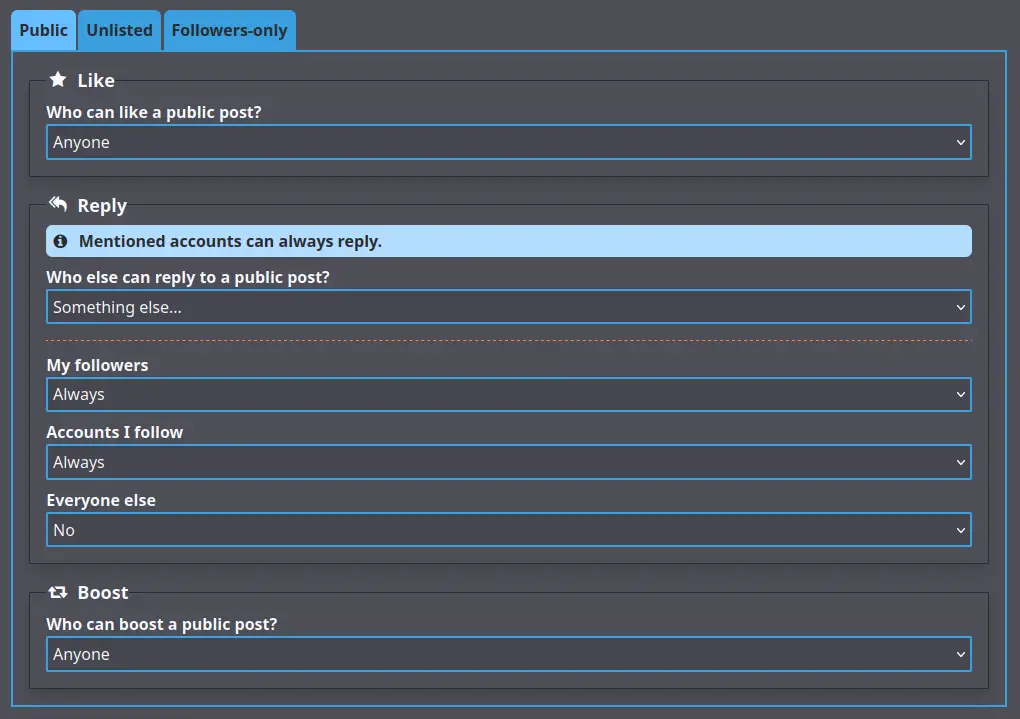
Bear in mind that policies do not apply retroactively. Posts created after you've applied a default interaction policy will use that policy, but any post created before then will use whatever policy was the default when the post was created.
No matter what policy you set on a post, visibility settings and blocks will still be taken into account before any policies apply. For example, if you set "anyone" for a type of interaction, that will still exclude accounts you have blocked, or accounts on domains that are blocked by your instance. "Anyone", in this case, essentially means "anyone who could normally see the post".
Finally, note that no matter what policy you set on a post, any accounts you mention in a post will always be able to reply to that post.
When you are finished updating your interaction policy settings, remember to click the Save policies button at the bottom of the section to save your changes.
If you want to reset all your policies to the initial defaults, you can click on Reset to defaults button.
DANGER
While GoToSocial respects interaction policies, it is not guaranteed that other server softwares will, and it is possible that accounts on other servers will still send out replies and boosts of your post to their followers, even if your instance forbids these interactions.
As more ActivityPub servers roll out support for interaction policies, this issue will hopefully diminish, but in the meantime GoToSocial can offer only a "best effort" attempt to restrict interactions with your posts according to the policies you have set.