Export & Import
In the export & import section, you can export data from your GoToSocial account, or import data into it.
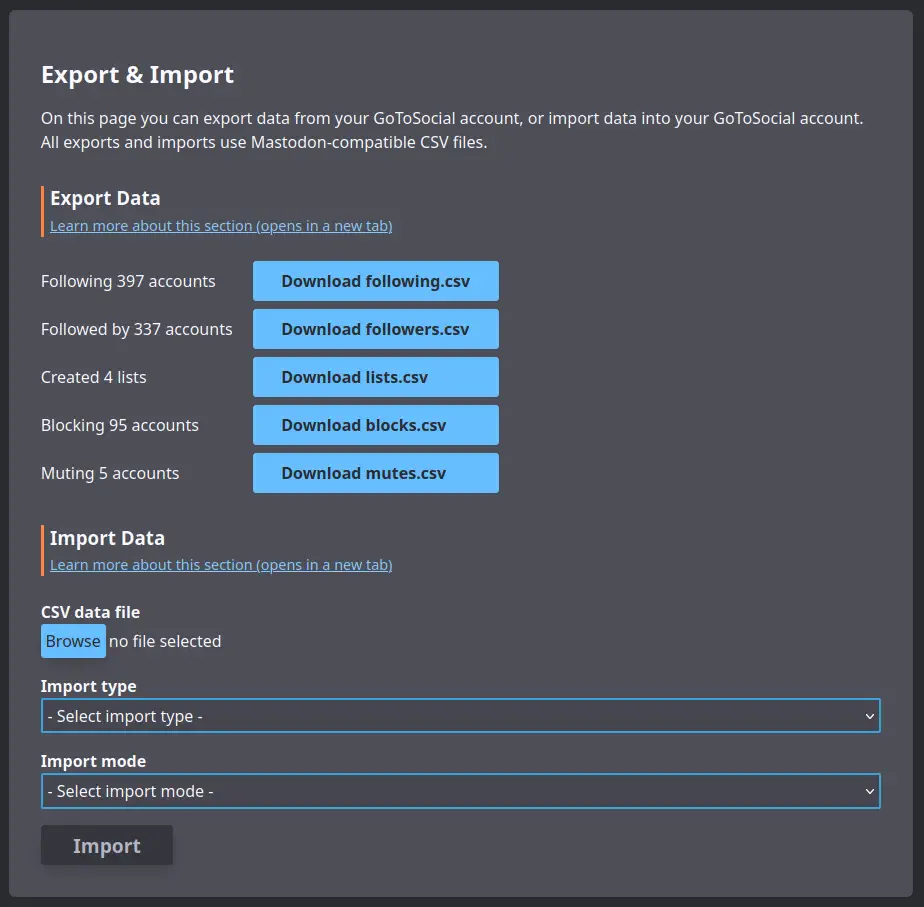
Export
To export your following, followers, lists, account blocks, or account mutes, you can use the button on this page.
All exports will be served in Mastodon-compatible CSV format, so you can import them later into Mastodon or another GoToSocial instance, if you like.
Import
You can use the import section to import data from another account into your GoToSocial account, using CSV files exported from the other account.
This is useful in cases where you've migrated your account to a GoToSocial account, and you want to keep your list of accounts that you followed, blocked, etc., on your previous account.
To import data into your account, first click on "Browse" and select a Mastodon-compatible CSV file exported from Mastodon or another compatible instance.
Then, use the drop-down selector to pick what kind of data you are uploading via the CSV file.
WARNING
Be careful when selecting "type" or you may end up accidentally blocking a bunch of accounts you meant to follow, or vice versa!
Then choose whether you want to either merge the new data with the existing data of that type on your GoToSocial account, or whether you want to overwrite existing data of that type with the data contained in the CSV file.
If you choose merge, then any data contained in the CSV file will be added to existing data without removing any of that existing data.
For example, if you follow account1, and account2 from your GoToSocial account, and you're uploading a CSV file containing follows of account3, and account4, and using mode merge, then at the end of the import you will be following account1, account2, account3, and account4.
If you choose overwrite, then any data contained in the CSV file will replace the existing data, by removing entries not contained in the CSV file.
For example, if you follow account1, and account2 from your GoToSocial account, and you're uploading a CSV file containing follows of account3, and account4, and using mode overwrite, then at the end of the import you will be following account3, and account4. Your follows of account1 and account2 will be removed.
Both merge and overwrite operations are idempotent, which basically means that duplicate entries in the existing data and in the CSV file are not an issue, and you can do imports of the same data multiple times if you need to retry importing for whatever reason.
INFO
For a variety of reasons, it will not always be possible to recreate every entry in an uploaded CSV file via importing. For example, say you are trying to import a CSV of follows containing example_account, but example_account's instance has gone offline, or their instance blocks yours, or your instance blocks theirs, etc. In this case, the follow of example_account would not be created.
WARNING
The CSV format for mutes does not contain expiration data, so temporary mutes are exported (and imported) as permanent mutes.